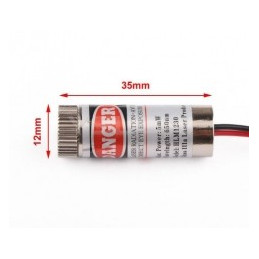
Reference: MSJBND_LM-red-line
650nm 5mW Red Laser Line Module Glass Lens
Tensiune de alimentare: 5V
lei20.96
In stock


 We deliver to lockers!
Pick up your orders anytime, hassle-free!
 Fast Delivery!
Orders placed by 2:00 PM are shipped the same day. Delivered within 24h!
 2-Year Warranty
Reliable products, worry-free!
 Easy 14-Day Returns
Unused items? No questions asked!
This WS2812 Addressable RGB LED module is ideal for decorative lighting projects and customized light effects. Each LED can be individually controlled via a digital signal, allowing multiple modules to be connected in series for complex effects.
✔ LED Type: WS2812B Addressable RGB
✔ Power Supply: 5V DC
✔ PCB Diameter: 11mm
✔ LED Size: 5mm
✔ Interface: DI (Data In), DO (Data Out), 5V, GND
✔ Control: Serial protocol (single data wire)
To complete this example, you will need the following components:
1 x 1000 µF capacitor (pay close attention to the capacitor's polarity)
1 x 470-ohm resistor
1 x UNO development board (with USB cable)
1 x 5V DC power source
Various wires for electrical connections
At least one WS2812 addressable module
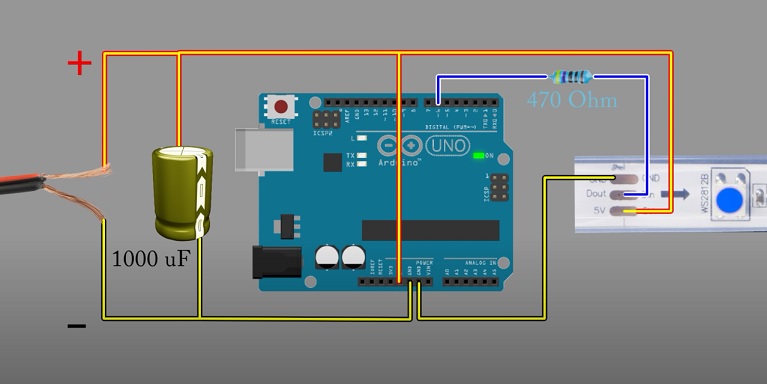
1. Connect the components as shown in the image above (pay close attention to the capacitor's polarity).
2. Connect the UNO development board to the PC.
3. Open Arduino IDE and set:
Tools -> Board: Arduino UNO
Tools -> Port: the port where the development board is connected.
4. Download the PololuLedStrip library available in the DOWNLOADS section.
5. Load the library into Arduino IDE using the menu: Tools -> Manage libraries -> search for "pololuledstrip".
6. After loading the library, open the following example:
File -> Examples -> PololuLedStrip -> LedStripColorTester.
7. In the line of code PololuLedStrip<12> ledStrip;, change the value 12 to the one used (in the example image above, digital pin 6).
8. Open Serial Monitor, set the baud rate to 115200, and you can test/change the LED color using color codes (for example, to obtain red, type 255.0.0, green 0.255.0, etc.).
✔ 1x WS2812 Addressable RGB LED Module (11mm)
Your review appreciation cannot be sent
Report comment
Report sent
Your report cannot be sent
Write your review
Review sent
Your review cannot be sent
Reference: MSJBND_LM-red-line
Reference: SKPDIK
Reference: KPJEXP
Reference: RZGRPW
check_circle
check_circle